> ## Documentation Index
> Fetch the complete documentation index at: https://docs.mixpanel.com/llms.txt
> Use this file to discover all available pages before exploring further.
# Use Mixpanel Agent to Go From Question to Decision, Faster
**Mixpanel Agent** is an AI analyst built directly into Mixpanel. Ask it a question or give it a task and it interprets your intent, selects the right tools, and returns an answer without you specifying each step.
You use it in two ways. The first is conversational: ask it a question, describe what you want to see, and it responds in the moment. The second is through agents you configure: set one up once and it runs on your behalf — monitoring, explaining, interpreting — without you having to ask each time. You'll find Mixpanel Agent in the side navigation for a full-page experience, or as a contextual panel you can open alongside any report or board.
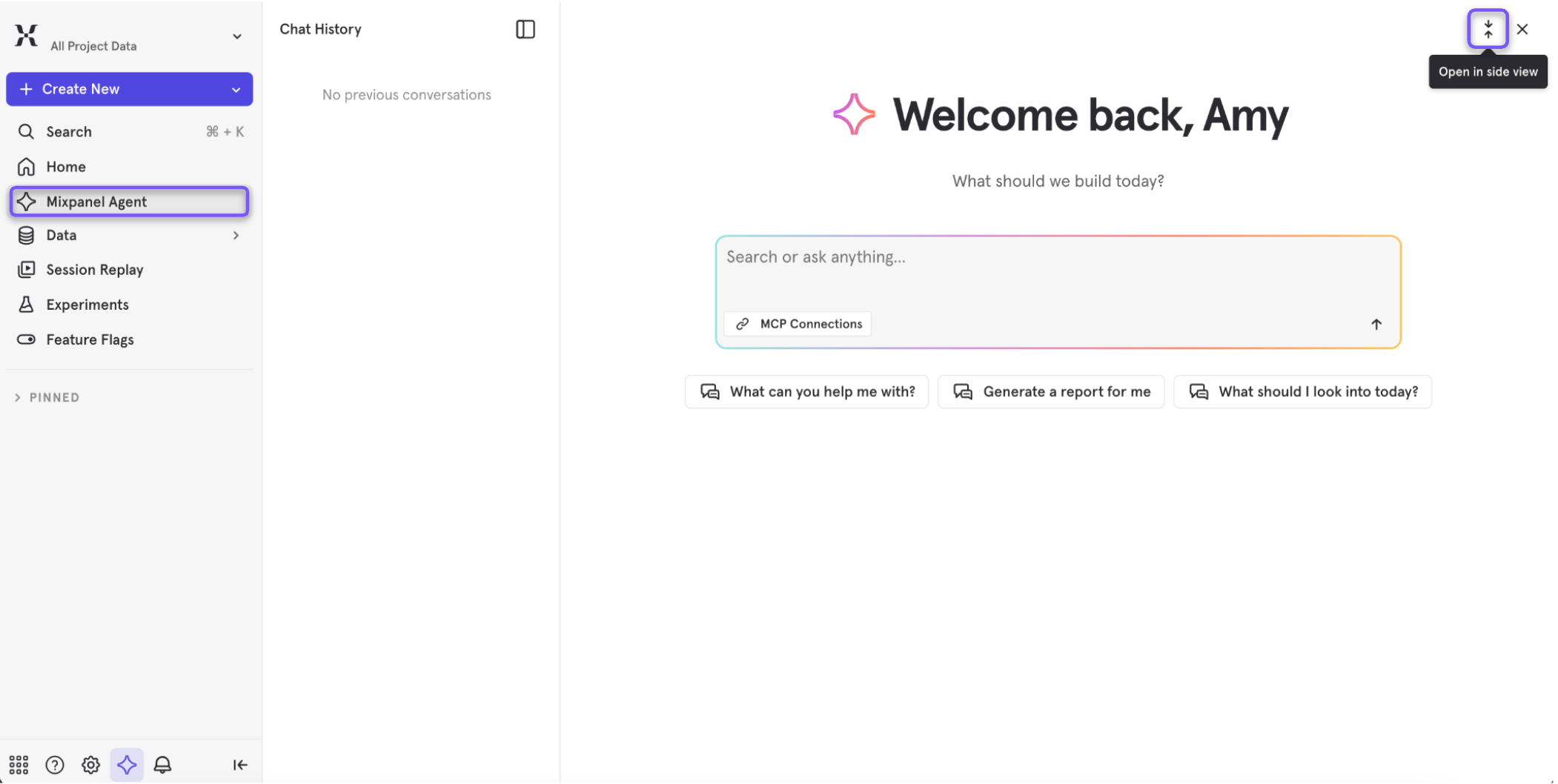 This guide covers how to get the most out of each capability and how to migrate workflows you're already running today. If you're looking to query Mixpanel from an external AI tool like Claude or ChatGPT, see [Use Mixpanel MCP](/guides/mcp) instead.
See how [Howbout used Mixpanel Agent to self-serve a full feature-adoption and retention analysis](https://mixpanel.com/customers/how-howbout-uses-mixpanel-agent-for-self-serve-analytics/) in 30 minutes — work that would normally take an analyst a full day — freeing the analyst up for deeper problems.
## See it in action
New to Mixpanel Agent? Take a quick interactive walkthrough before diving into the details.
> Note: The interactive demo above isn’t supported on smaller screens, but you can [click here](https://mixpanel.navattic.com/smr0zaw) to open the experience in a new window.
## Before you get started
Two project-level settings shape how all four capabilities behave.
### Business Context
Business Context is a shared layer where your team defines what Mixpanel can't infer from raw events: key metric definitions, fiscal calendar, launch history, team structure. Every AI surface reads it automatically.
Without it, AI answers are generic. With it, Mixpanel Agent knows your context — that "activation" means a user completed a key value moment, or that a drop on November 1 isn't anomalous because it's the day after a promo ended. For setup instructions, see the [Business Context documentation](/docs/business-context).
**Pro tip:** Start with your primary metric definitions and your fiscal calendar. Those two entries eliminate many of the common sources of AI misinterpretation.
### Verified Mode
If your project has inconsistent event naming, duplicate metrics, or unverified events, the AI will work with what it finds — and two people asking the same question may get different answers. Verified Mode is how admins control that.
When it's on, AI features lean harder on [verified data](/docs/data-governance/lexicon#verify-data): events, metrics, behaviors, and cohorts your team has explicitly reviewed in Lexicon. The AI still works with everything you ask about — nothing is removed from its reach — but it strongly prefers verified equivalents and clearly flags any result that draws on unverified data. Users querying AI features see those labels, so they know which parts of an answer haven't been reviewed yet — this is intentional, so they know it's a setting, not a Mixpanel limitation.
This is primarily an enterprise concern. It's most valuable when you're rolling out AI access broadly — to PMs, engineers, and stakeholders who may not know the difference between `checkout_complete` and `checkout_complete_v2`.
The tradeoff: Verified Mode puts the burden of verification on admins, and its payoff scales with how much you've verified. If your team ships events faster than they get verified, agents don't lose access to anything — but more of what they return comes back flagged as unverified, so the labels carry less signal. The mode is most worthwhile once a meaningful share of your high-traffic data is verified.
**Pro tip:** Before enabling Verified Mode, audit your verified events against the queries your team runs most often. Get your high-traffic events verified first, then enable the mode.
***
## What you can do with Mixpanel Agent
Mixpanel Agent gives you four capabilities. They're designed to work together, but each one stands on its own.
| Capability | What it replaces | Best for |
| :- | :- | :- |
| **Ask Mixpanel Agent** | Hours of query-building and context-switching | Anyone who needs a quick answer or a new view without starting from scratch |
| **RCA Agent** | 2–3 hours of manual segment slicing | PMs and analysts investigating a metric shift |
| **KPI Agent** | Weekly manual metric reporting | Anyone accountable for a specific number |
| **Experiments Agent** | Hours of manual setup and result interpretation | PMs and engineers running A/B tests |
They map to four distinct moments in how you work with data: getting an answer, explaining a change, staying close to a metric, and running experiments with confidence.
**The full loop in practice:** A stakeholder asks for a view of onboarding performance after a recent flow change. Someone asks Mixpanel Agent to build it — it's ready in minutes. The PM notices activation dropped 8% and triggers RCA, which traces it to a new onboarding variant. The team pauses the variant and uses the Experiments Agent to interpret the results and roll back. The PM then sets up the KPI Agent on activation rate to watch the recovery.
**Pro tip:** Your judgment is still in the middle of that loop. What the four capabilities remove is the mechanical work surrounding the decisions.
***
## Ask Mixpanel Agent
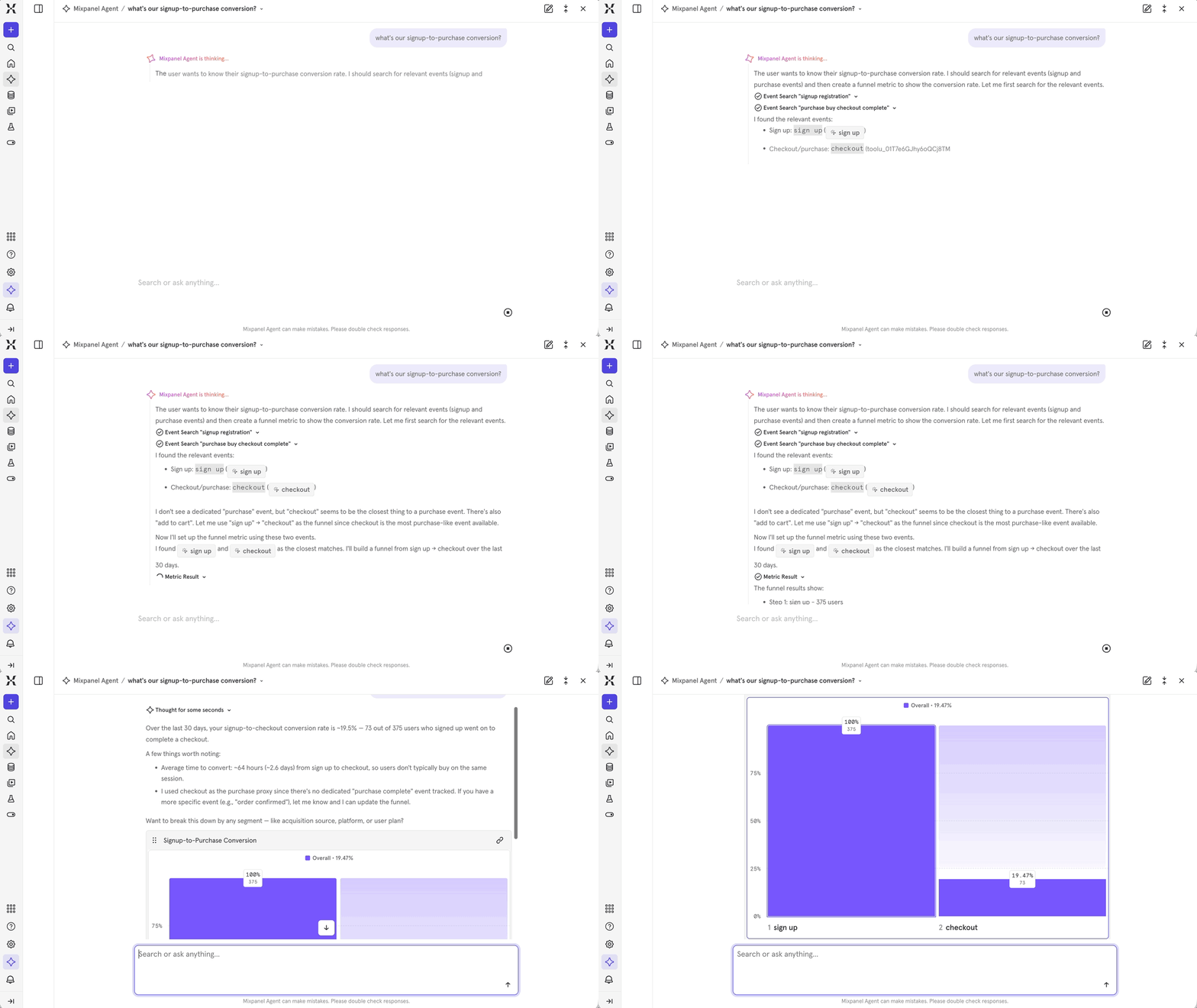
Open Mixpanel Agent from anywhere and ask in plain language. A single prompt can run an analysis, build a report, create a cohort, or walk you through session replays without you specifying each step. The Agent automatically picks up your current page as context, so you don't need to describe your setup first.
This guide covers how to get the most out of each capability and how to migrate workflows you're already running today. If you're looking to query Mixpanel from an external AI tool like Claude or ChatGPT, see [Use Mixpanel MCP](/guides/mcp) instead.
See how [Howbout used Mixpanel Agent to self-serve a full feature-adoption and retention analysis](https://mixpanel.com/customers/how-howbout-uses-mixpanel-agent-for-self-serve-analytics/) in 30 minutes — work that would normally take an analyst a full day — freeing the analyst up for deeper problems.
## See it in action
New to Mixpanel Agent? Take a quick interactive walkthrough before diving into the details.
> Note: The interactive demo above isn’t supported on smaller screens, but you can [click here](https://mixpanel.navattic.com/smr0zaw) to open the experience in a new window.
## Before you get started
Two project-level settings shape how all four capabilities behave.
### Business Context
Business Context is a shared layer where your team defines what Mixpanel can't infer from raw events: key metric definitions, fiscal calendar, launch history, team structure. Every AI surface reads it automatically.
Without it, AI answers are generic. With it, Mixpanel Agent knows your context — that "activation" means a user completed a key value moment, or that a drop on November 1 isn't anomalous because it's the day after a promo ended. For setup instructions, see the [Business Context documentation](/docs/business-context).
**Pro tip:** Start with your primary metric definitions and your fiscal calendar. Those two entries eliminate many of the common sources of AI misinterpretation.
### Verified Mode
If your project has inconsistent event naming, duplicate metrics, or unverified events, the AI will work with what it finds — and two people asking the same question may get different answers. Verified Mode is how admins control that.
When it's on, AI features lean harder on [verified data](/docs/data-governance/lexicon#verify-data): events, metrics, behaviors, and cohorts your team has explicitly reviewed in Lexicon. The AI still works with everything you ask about — nothing is removed from its reach — but it strongly prefers verified equivalents and clearly flags any result that draws on unverified data. Users querying AI features see those labels, so they know which parts of an answer haven't been reviewed yet — this is intentional, so they know it's a setting, not a Mixpanel limitation.
This is primarily an enterprise concern. It's most valuable when you're rolling out AI access broadly — to PMs, engineers, and stakeholders who may not know the difference between `checkout_complete` and `checkout_complete_v2`.
The tradeoff: Verified Mode puts the burden of verification on admins, and its payoff scales with how much you've verified. If your team ships events faster than they get verified, agents don't lose access to anything — but more of what they return comes back flagged as unverified, so the labels carry less signal. The mode is most worthwhile once a meaningful share of your high-traffic data is verified.
**Pro tip:** Before enabling Verified Mode, audit your verified events against the queries your team runs most often. Get your high-traffic events verified first, then enable the mode.
***
## What you can do with Mixpanel Agent
Mixpanel Agent gives you four capabilities. They're designed to work together, but each one stands on its own.
| Capability | What it replaces | Best for |
| :- | :- | :- |
| **Ask Mixpanel Agent** | Hours of query-building and context-switching | Anyone who needs a quick answer or a new view without starting from scratch |
| **RCA Agent** | 2–3 hours of manual segment slicing | PMs and analysts investigating a metric shift |
| **KPI Agent** | Weekly manual metric reporting | Anyone accountable for a specific number |
| **Experiments Agent** | Hours of manual setup and result interpretation | PMs and engineers running A/B tests |
They map to four distinct moments in how you work with data: getting an answer, explaining a change, staying close to a metric, and running experiments with confidence.
**The full loop in practice:** A stakeholder asks for a view of onboarding performance after a recent flow change. Someone asks Mixpanel Agent to build it — it's ready in minutes. The PM notices activation dropped 8% and triggers RCA, which traces it to a new onboarding variant. The team pauses the variant and uses the Experiments Agent to interpret the results and roll back. The PM then sets up the KPI Agent on activation rate to watch the recovery.
**Pro tip:** Your judgment is still in the middle of that loop. What the four capabilities remove is the mechanical work surrounding the decisions.
***
## Ask Mixpanel Agent
Open Mixpanel Agent from anywhere and ask in plain language. A single prompt can run an analysis, build a report, create a cohort, or walk you through session replays without you specifying each step. The Agent automatically picks up your current page as context, so you don't need to describe your setup first.
 ### When to use it
* You need a quick answer without opening a report
* A stakeholder asked a question you don't have a board for yet
* You want to explore an area quickly before deciding whether it's worth deeper instrumentation
### How to use it
A few things you can ask:
* **Data questions:** "Which acquisition channel has the best 30-day retention?" or "How did retention change after the onboarding update?"
* **Build requests:** "Build me a dashboard for our referral program — invites sent, signups from referrals, conversion rate, breakdown by channel." The Agent generates a full multi-chart board. Treat it as a first draft and review the events before saving.
* **Analysis:** "Compare mobile vs. desktop checkout conversion" or "What's the drop-off in our signup funnel?"
**Pro tip:** The more your Business Context is configured, the better the answers. If the Agent knows what "activation" means at your company, it uses the right events — not its best guess.
### In practice
Marcus leads growth at a consumer app. His VP asks for a view of referral program performance — something that would normally take an hour to build. He asks Mixpanel Agent: "Show me referral program performance — invites sent, signups from referrals, conversion rate, and breakdown by referral channel." A six-chart board comes back in under a minute. He fixes one event mapping and sends the link before end of day.
***
## RCA Agent
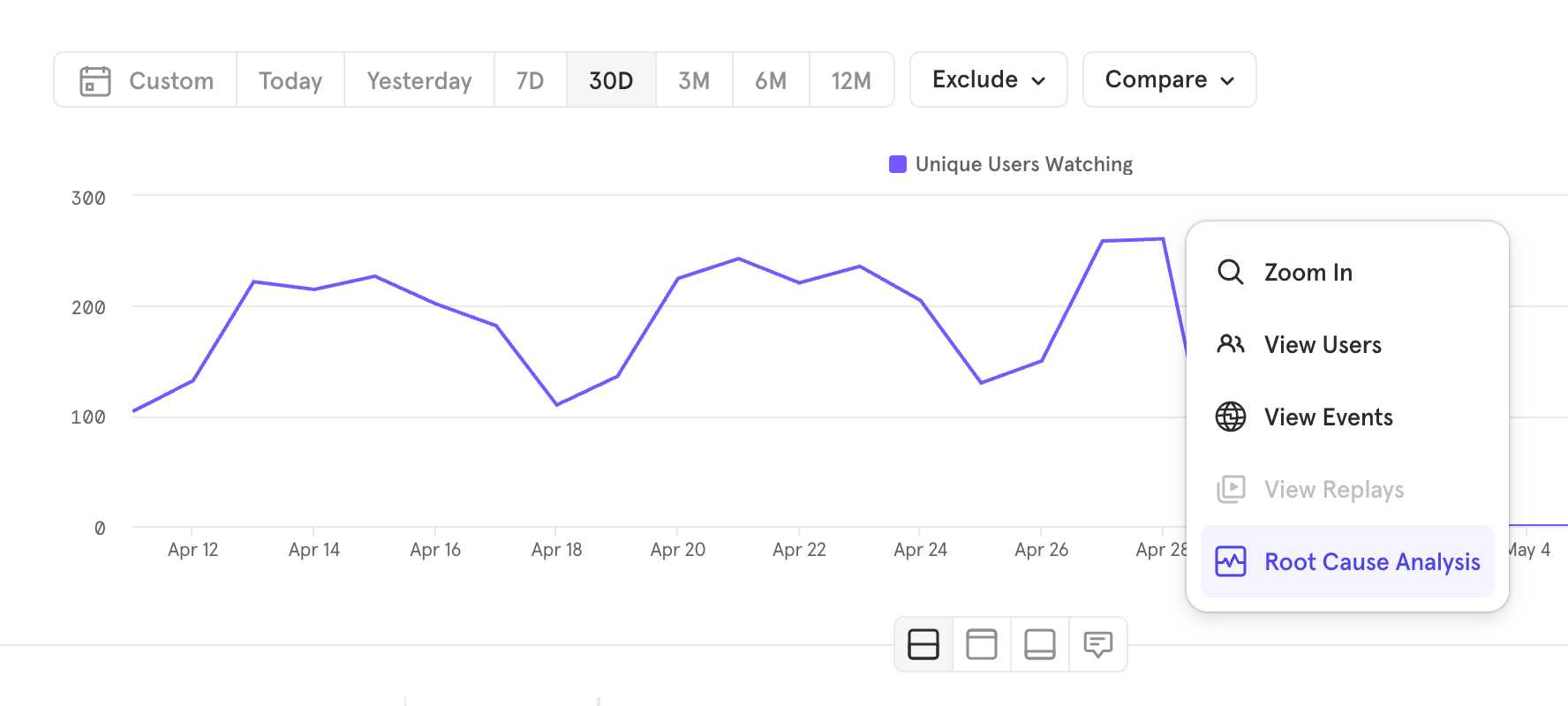
When a metric moves, the RCA Agent tells you why. Trigger it from an Insights report, an alert, or directly through Mixpanel Agent, and it generates a board with contribution factor analysis, ranked dimensions, an AI interpretation, confidence levels, and suggested next steps.
This is reactive by design — it runs when you ask it to.
### When to use it
* You need a quick answer without opening a report
* A stakeholder asked a question you don't have a board for yet
* You want to explore an area quickly before deciding whether it's worth deeper instrumentation
### How to use it
A few things you can ask:
* **Data questions:** "Which acquisition channel has the best 30-day retention?" or "How did retention change after the onboarding update?"
* **Build requests:** "Build me a dashboard for our referral program — invites sent, signups from referrals, conversion rate, breakdown by channel." The Agent generates a full multi-chart board. Treat it as a first draft and review the events before saving.
* **Analysis:** "Compare mobile vs. desktop checkout conversion" or "What's the drop-off in our signup funnel?"
**Pro tip:** The more your Business Context is configured, the better the answers. If the Agent knows what "activation" means at your company, it uses the right events — not its best guess.
### In practice
Marcus leads growth at a consumer app. His VP asks for a view of referral program performance — something that would normally take an hour to build. He asks Mixpanel Agent: "Show me referral program performance — invites sent, signups from referrals, conversion rate, and breakdown by referral channel." A six-chart board comes back in under a minute. He fixes one event mapping and sends the link before end of day.
***
## RCA Agent
When a metric moves, the RCA Agent tells you why. Trigger it from an Insights report, an alert, or directly through Mixpanel Agent, and it generates a board with contribution factor analysis, ranked dimensions, an AI interpretation, confidence levels, and suggested next steps.
This is reactive by design — it runs when you ask it to.
 ### When to use it
* A chart moved and you want an explanation without 30 minutes of manual segment slicing
* An alert fired and you need to know whether it's signal or noise before escalating
* You want a structured, shareable artifact, not just a hypothesis
### How to use it
Trigger the RCA Agent from three entry points:
* **From an Insights report:** Trigger RCA directly when you see a metric shift. The Agent analyzes the visible change in context.
* **From an alert:** Launch RCA from the notification. Detection and diagnosis in one step.
* **From Mixpanel Agent:** Ask "why did this metric drop?" and the Agent routes it to RCA and returns a structured explanation.
**Pro tip:** You can tell RCA which properties to always consider. Go to **Project Settings → AI Settings** to prioritize the dimensions most relevant to your team's analysis.
### What you get back
* **Contribution factor analysis** — which dimensions explain the most variance in the shift
* **Ranked dimensions** — segments or properties most likely driving the change, ordered by significance
* **AI interpretation** — a plain-language explanation of what the analysis shows
* **Confidence levels** — how strongly the data supports each finding
* **Suggested next steps** — where to look or what to test next
After reviewing an RCA board, you can rate its accuracy. That feedback improves future results for your project.
**Pro tip:** The RCA Agent uses your Business Context when it's configured — pulling from both your Organization and Project settings. Cyclical patterns, seasonality, and known launches are all factored into its reasoning, so a traffic spike on Black Friday gets interpreted differently than an unexplained one.
### In practice
Priya is a PM at a SaaS company. Checkout completion dropped 9% week-over-week. She triggers RCA from the Insights report. Top contribution factor: users on iOS 17.4, 61% of the variance, starting Friday — the same day a payment SDK update shipped. She sends the board to engineering: "SDK-related, iOS 17.4, started Friday, confidence is high." They're investigating within the hour.
***
## KPI Agent
The KPI Agent monitors a metric you care about and delivers a digest to you on a schedule you set. Instead of opening a dashboard to check whether something moved, it comes to you — with context, not just a number.
### When to use it
* You own a KPI and need to stay informed without opening a dashboard every day
* You send a weekly metric update to stakeholders and want to stop building it manually
* You want a digest that reflects what matters to you, not just raw numbers
* You track a KPI across many segments — regions, facilities, accounts — and want one digest that ranks them instead of one alert per value
### How to use it
1. Set it up from the Automation creation flow, or just ask Mixpanel Agent — either way it starts as a Draft you activate when you're ready
2. Choose the metric you want to monitor, and optionally a property to break it down by — the digest surfaces the top and bottom performing segments alongside the overall number
3. Set your cadence — daily, weekly, or monthly
4. Choose your delivery destination — Slack or email
5. Use "run now" to preview the digest before committing to a cadence
The KPI Agent supports [Insights](/docs/reports/insights)-based queries on a daily, weekly, or monthly cadence. Funnel and Retention report support is coming soon.
### In practice
Lena owns weekly active users at a fintech company. Every Thursday she pulled the number manually, wrote context, and posted a Slack update. She sets up the KPI Agent on her WAU query with a Wednesday evening delivery. The Thursday update now takes 90 seconds instead of 20 minutes.
***
## Experiments Agent
Running an experiment has always required statistical knowledge most PMs don't have — choosing the right confidence level, understanding what a health check failure means, knowing whether a 4% lift is significant enough to ship.
The Experiments Agent works alongside you inside the [experiments](/docs/experiments) and [feature flags](/docs/featureflags) pages. Ask it to help configure an experiment, explain results in plain language, or roll out a winner. It's a conversation, not a form.
Its defining behavior is that it **recommends rather than enforces**. Every setting it proposes comes with a one-line reason and can be overridden. You stay the decision-maker; the Agent's job is to make sure no consequential decision is made silently.
### When to use it
* You're setting up a new experiment and want to make sure it's configured correctly before launch
* Your team can run experiments but isn't confident choosing sample sizes, MDE, or a statistical model
* A health check fired and you need to know whether it's a real problem
* Your experiment has results and you need to know what they mean and what to do next
* You want to ship a winning variant without navigating the decision modal yourself
### How to use it
Open Mixpanel Agent on any experiment or feature flag page, or ask it to create an experiment from anywhere.
#### Setting up an experiment
The Agent works backward from your hypothesis: the hypothesis dictates the metrics that test it, the metrics dictate the sample size, and sample size plus traffic dictate duration and statistical model.
The Agent coaches you into a falsifiable directional claim with a stated mechanism: *If \, then \ will \, because \.* If you give it "test the new onboarding," it asks for the change, the outcome metric, the expected direction, the minimum effect worth shipping, and why you expect it to work.
The mechanism isn't a formality — it forces the question of whether your metric is actually downstream of your change. An onboarding-screen test shouldn't be measured on Day-30 retention if nobody has reached Day 30 yet.
The Agent assigns each metric one of three roles and sanity-checks your choices:
* **Primary** (1–3 max) — decides ship/no-ship. Each additional primary raises the false-positive rate.
* **Guardrail** — must not regress, even if primaries win. The Agent flags an experiment with none, because guardrails are the regression backstop on a ship decision.
* **Secondary** — diagnostic only, never decisional. If you mention a metric in your hypothesis and then classify it as secondary, the Agent asks whether it should be promoted.
It checks each metric for the common setup traps: a metric the change can't move, a metric whose denominator the treatment creates from scratch, a lagging indicator that can't respond inside your window, and a missing `direction` on cancel/error/latency-style metrics, where the default of "up" would later read a regression as a win.
The Agent presents all three testing models with a recommendation, and it settles the model *before* asking about MDE and duration, because the model changes what those numbers mean.
It then proposes the statistical configuration as a single grouped question you can veto in one pass, rather than one prompt per setting.
Rather than guessing, the Agent queries your project: baseline rate and variance for each primary metric over the prior two to four weeks, and daily volume on the exposure event over the same window. From those it computes the sample size each variant needs to detect your MDE, and the duration that implies at your actual traffic.
When the numbers don't work, it says so and gives you the real options: accept a larger MDE, allocate more traffic, enable CUPED to cut variance, pick a higher-volume primary metric, or don't run the experiment. It also flags the reverse case — an audience narrow enough to be clean but too small to reach power.
**Pro tip:** The Agent searches your prior experiments before proposing anything new. If the same feature has been tested, it surfaces those results first — and reuses the realized baseline rates and exposure rates to set a realistic MDE and duration instead of a generic default.
#### Five things the Agent never decides silently
On any create, the Agent states or confirms each of these, in this order, with a one-line reason attached:
| Decision | What the Agent does |
| :- | :- |
| **Primary metric + direction** | Echoes it back for a yes/no, even when it inferred it from your request |
| **Testing model** | Presents frequentist, sequential, and Bayesian with a recommendation — before MDE and duration |
| **MDE** | Confirms the number rather than carrying one over, with a one-line explanation of the higher-vs-lower trade-off |
| **Duration / end condition** | Asks, or states it as an explicit assumption you can change |
| **Statistical configuration** | Recommends SRM, CUPED, Winsorization, multiple-testing correction, and any non-95% confidence level |
The only setting it applies without asking is excluding QA and internal traffic. It turns that on for any experiment whose results matter, because the cost of enabling it is zero and the cost of contaminated results is rerunning the experiment.
#### Recommended defaults and when it changes them
| Setting | Default it recommends | When it recommends otherwise |
| :- | :- | :- |
| **Testing model** | Sequential | Frequentist when you're hunting a very small lift on high volume; Bayesian when you want the probability a variant beats control |
| **Confidence level** | 95% | 99% for high-stakes irreversible ships; 90% for low-stakes exploration, with the inflated false-positive rate called out |
| **Traffic split** | 50/50, sticky assignment | Even split across 3+ arms; deliberately uneven for a risky rollout |
| **[Multiple-testing correction](/docs/experiments#benjamini-hochberg-correction)** | Benjamini-Hochberg, on with 2+ primaries or 2+ treatment variants | [Bonferroni](/docs/experiments#bonferroni-correction) when you need strict family-wise control; off with a single primary and single treatment |
| **[CUPED](/docs/experiments#cuped-controlled-experiment-using-pre-experiment-data)** | On when the metric correlates with pre-exposure behavior | Off for new-user-only experiments and brand-new metrics, where there's no pre-exposure data to use |
| **[Winsorization](/docs/experiments#winsorization)** | On at the 5th/95th percentile for revenue, spend, and duration metrics | Off for conversion metrics, and when the tail behavior *is* the hypothesis |
| **[SRM](/docs/experiments#health-checks)** | On | Recommended on always — it's free to run and catches broken bucketing within hours |
Sequential is the default because peeking at results early is the most common mistake the Agent sees, and sequential testing makes it statistically safe. The Agent explains each recommendation in terms of what it buys you: CUPED, for instance, cuts variance 30–70%, which means the same statistical power off meaningfully less traffic.
**Pro tip:** Ask "why?" on any recommendation. The Agent keeps rationale to one sentence per decision by design — over-explaining was the single most common complaint in beta — but it will give you the full reasoning, including the underlying math, when you ask for it.
#### Pre-launch checks
Before launch, the Agent cross-references your draft configuration against known pitfalls and returns only the ones that actually apply. Each finding names the specific value that triggered it and comes with a fix that pre-fills the relevant field, so you can accept a remediation without retyping parameters.
Two findings are blockers, because the experiment cannot answer the question you're asking it regardless of how clean the rest of the setup is:
| Check | Severity | Fires when |
| :- | :- | :- |
| **Underpowered duration** | Blocker | Expected exposures are under half the per-variant sample your MDE requires |
| **Cohort too small** | Blocker | The cohort holds fewer eligible users than your per-variant target multiplied by the number of variants |
| **Marginally underpowered** | Warning | Expected exposures land between half and one full required sample |
| **Pre-experiment bias likely** | Warning | Retro A/A is on and a continuous, retention, or funnel metric is configured, but CUPED is off |
| **High variance, no Winsorization** | Warning | A continuous-style metric is configured with outlier capping off |
| **Multiple primaries, no correction** | Warning | 2+ primary metrics with multiple-testing correction off |
| **Missing guardrails** | Warning | No guardrail metric is configured |
| **Hypothesis / metric mismatch** | Warning | Your configured primary metrics don't appear to match what the hypothesis predicts |
| **No leading indicator** | Warning | Every primary metric is lagging by construction, so none can move inside the planned window |
For the two blockers, the fix is quantified rather than vague: it tells you roughly how many days to extend, or the cohort size and per-variant target that would make the experiment viable.
**Pro tip:** You can ask for these checks at any point while filling out an experiment, not just at the end. The Agent skips any check whose inputs you haven't supplied yet, so a half-finished draft returns real findings instead of a wall of "missing input" noise.
#### Explaining health checks
When [SRM or Pre-Experiment Bias](/docs/experiments#health-checks) fires, ask the Agent what it means. It reads the same computed verdict the in-app banner reads, so its explanation never contradicts what you're looking at in the experiment UI.
For either check it tells you which metrics and variants are affected — useful when the banner collapses several into "+2 others" — how far the observed split or pre-period difference is from what you'd expect by chance, the likely causes ranked by plausibility, and the recommended action.
That action isn't always "restart." A failing Retro A/A on a new-visitor experiment, where users have no pre-exposure behavior to differ on, means something different from a failure on an established cohort. The Agent distinguishes the cases and will tell you when a firing check is safe to proceed past.
#### Interpreting results
Ask the Agent to summarize your results and it reads the full experiment — your hypothesis, every metric and its role, the statistical output, exposure counts, and health check status — then returns a plain-language verdict: what happened, whether it's significant, and a recommendation to ship, iterate, or kill.
It translates the statistics rather than restating them. Instead of "p=0.03, lift=+4.2%, CI \[1.1%, 7.3%]," you get the confidence interval expressed as a range of plausible real effects. For Bayesian experiments it reports posterior probabilities and credible intervals, never p-values.
It also checks guardrails against a hard gate: a 5% relative regression on any guardrail is treated as blocking a ship, even when the primary metric wins.
#### Rolling out a winner
After the Agent gives you a results summary, tell it to ship the winner. It concludes the experiment and writes the decision documentation from its own summary, so you don't have to touch the decision modal. If the experiment runs on a Mixpanel feature flag, it also updates the flag to send all traffic to the winning variant. If you track the experiment through your own exposure events, shipping records the decision only; roll out the winner in the system that assigns variants.
### What to ask it
Setup:
* "Create an experiment to test a one-page checkout against the current three-step flow."
* "Is my sample size big enough to detect a 5% lift on checkout conversion?"
* "What metrics should I use as guardrails for a pricing page test?"
* "Should I enable CUPED for this experiment?"
* "Has anyone on my team already tested this feature?"
* "Run the pre-launch checks on this draft."
Monitoring and results:
* "Why is my Retro A/A check failing?"
* "Which metrics are flagged by the SRM warning?"
* "Is this significant yet, or should I let it run longer?"
* "Summarize these results for my VP."
* "Ship the winning variant."
### Limits worth knowing
The Agent reads the data in your experiment. If your experiment was misconfigured before launch — wrong metric, insufficient sample size, missing `direction` on a guardrail — the Agent will flag what it sees, but it can't fix what already happened. Use it during setup, not just at results time.
* **It recommends; you decide.** The Agent doesn't change your configuration or launch an experiment without you. Pre-launch blockers must be acknowledged before you can create the experiment; warnings are advisory.
* **Bayesian experiments work differently.** Multiple-testing corrections don't apply to posterior probabilities, so the Agent turns correction off and omits that recommendation. Fixed-horizon power calculations don't determine when a Bayesian experiment becomes decisive. SRM and Retro A/A still apply. See [which methods apply to Bayesian experiments](/docs/experiments#which-methods-apply-to-bayesian-experiments).
* **Segment-level breakdowns of experiment results aren't available yet.** The Agent interprets overall and per-metric results; slicing results by property is planned.
* **Secondary metrics are never decisional.** If a metric matters to your ship decision, the Agent will push you to make it primary or a guardrail.
### In practice: getting the setup right
Jordan is a PM at a health platform. Her team can set up experiments in the UI, but nobody is confident about the statistics — and a bad configuration means a wrong decision that nobody catches for weeks.
She asks the Agent to set up a test on a redesigned supplement recommendation flow. It finds a related test from two quarters ago and reuses its realized baseline conversion rate instead of guessing. It proposes uniques of `recommendation_accepted` as the primary metric, recommends sequential so her team can check in early without invalidating the result, and asks what lift would be worth shipping. She says 5%.
The Agent comes back with a problem: at her current traffic, 5% on that baseline needs about four weeks, not the two she had in mind. It offers the trade-offs — accept a 10% MDE and finish in two weeks, or enable CUPED, which on a metric this correlated with pre-exposure behavior gets her most of the way there. She takes CUPED and a three-week run. It also flags that she has no guardrail and suggests time-to-recommendation.
The experiment launches correctly configured. Three weeks later she asks for a summary and forwards it, rather than a table of p-values, to her director.
### In practice: making the call
Dev is an engineer at a fintech company. His team's experiment on the savings goal flow has results — p-values, confidence intervals, a table of metrics — but nobody knows whether to ship the treatment or not.
He opens Mixpanel Agent on the results page and asks it to summarize. The Agent comes back: the treatment increased savings goal completion by 3.1%, both guardrail metrics passed, recommendation is to ship. It flags that session length trended down slightly and suggests a follow-up test.
The PM sends the summary to the VP instead of the raw stats table. The decision gets made in the same meeting.
***
## Migrating your existing workflows
Mixpanel Agent doesn't replace how you think about your data. It replaces the mechanical work between the question and the answer — and it makes some workflows practical that historically weren't.
| If you currently... | Migrate to... | What changes |
| :- | :- | :- |
| Send Board Subscriptions to stakeholders on a schedule | KPI Agent | The digest includes interpretation, not just numbers. |
| Manually pull a metric each week and write a summary | KPI Agent | The pull and the summary are automated. Your job is to review and act. |
| Open Mixpanel every morning to check if anything moved | KPI Agent | It comes to you — daily, weekly, or monthly, via Slack or email. You know where to dig in. |
| Investigate an alert by manually building breakdowns | RCA Agent | The investigation runs automatically. You get a ranked explanation instead of a starting point. |
| Build boards from scratch or browse templates to find a starting point | Ask Mixpanel Agent | Describe your question. The board is your first draft. |
| Copy a teammate's board and customize it for your team | Ask Mixpanel Agent | Describe your team's specific question and get a board built for it directly. |
| Manually interpret experiment results and write up a recommendation | Experiments Agent | Ask the Agent to summarize. It returns a verdict, key numbers, and a ship/kill recommendation in plain language. |
| Ask an analyst or data scientist to review each experiment config before launch | Experiments Agent | The Agent sizes the experiment from your own baseline data and flags misconfigurations before launch, so review is a check rather than a bottleneck. |
| Look up what SRM or pre-experiment bias means when a health check fires | Experiments Agent | Ask it. It names the affected metrics, ranks the likely causes, and tells you whether the failure is actually a problem. |
Those are direct replacements — workflows you're already running that an agent handles better. But there's a second category worth considering: things that weren't practical before because the effort was too high relative to the value, so teams either skipped them or did them infrequently. Agents change that calculus.
**On alerts:** Before, an [alert](/docs/features/alerts) was the beginning of an investigation. Now pair every meaningful alert with RCA — when it fires, the investigation runs automatically and you get a confidence-weighted explanation before you've opened Mixpanel.
**On questions that weren't worth asking:** A question like "what's driving retention in our power user cohort by acquisition channel" used to be a 2-hour task. Most of those questions didn't get answered because the people who could answer them were already underwater. That same question is now a 5-minute task.
**On metric ownership:** The mechanical parts of owning a KPI — the pull, the summary, the delivery — used to fall to whoever was accountable for the number. Now those are automated. What's left is interpreting movement, deciding what to investigate, and choosing what to do next.
***
## Key takeaways
* Configure Business Context before you do anything else — it's what turns generic AI responses into answers that reflect how your team actually works.
* Verified Mode is the right call for teams with broad AI access and a mature verification workflow. If your verification can't keep pace with instrumentation, the default experience is more reliable.
* Mixpanel Agent picks up your current page as context automatically — you don't need to describe your setup before asking a question.
* Pair every meaningful alert with RCA. The alert tells you something moved; RCA tells you why, before you've had to open a single breakdown.
* Set up the KPI Agent once on the metric you're accountable for and it delivers a digest on your schedule — daily, weekly, or monthly, via Slack or email.
* Use the Experiments Agent during setup, not just at results time — it can't fix a misconfigured experiment after the fact.
* The Experiments Agent recommends rather than enforces. It won't decide silently: your primary metric, testing model, MDE, duration, and statistical settings all come back to you with a one-line reason and a veto.
* The biggest shift these capabilities make isn't speed — it's what becomes worth doing. Questions that weren't practical before now take minutes.
**Next steps:** For access points, security, privacy details, and FAQs, see the [Mixpanel Agent documentation](/docs/mixpanel-agent).
***
## Quick reference
| | Ask Mixpanel Agent | RCA Agent | KPI Agent | Experiments Agent |
| :- | :- | :- | :- | :- |
| **Trigger** | On-demand | On-demand | Scheduled | On-demand |
| **Scope** | Any question or build request | Single metric shift | Single metric | Experiment setup, pre-launch checks, health checks, results, rollout |
| **Output** | Answer or multi-chart board | Generated RCA board | Personalized digest | Guided conversation + actions |
| **Delivery** | In-product | In-product | Slack or email | In-product |
| **Best for** | Getting answers fast | Explaining what changed | Staying close to a KPI | Designing and reading experiments without statistical expertise |
| **Uses Business Context** | Yes | Yes | Coming soon | Yes |
### When to use it
* A chart moved and you want an explanation without 30 minutes of manual segment slicing
* An alert fired and you need to know whether it's signal or noise before escalating
* You want a structured, shareable artifact, not just a hypothesis
### How to use it
Trigger the RCA Agent from three entry points:
* **From an Insights report:** Trigger RCA directly when you see a metric shift. The Agent analyzes the visible change in context.
* **From an alert:** Launch RCA from the notification. Detection and diagnosis in one step.
* **From Mixpanel Agent:** Ask "why did this metric drop?" and the Agent routes it to RCA and returns a structured explanation.
**Pro tip:** You can tell RCA which properties to always consider. Go to **Project Settings → AI Settings** to prioritize the dimensions most relevant to your team's analysis.
### What you get back
* **Contribution factor analysis** — which dimensions explain the most variance in the shift
* **Ranked dimensions** — segments or properties most likely driving the change, ordered by significance
* **AI interpretation** — a plain-language explanation of what the analysis shows
* **Confidence levels** — how strongly the data supports each finding
* **Suggested next steps** — where to look or what to test next
After reviewing an RCA board, you can rate its accuracy. That feedback improves future results for your project.
**Pro tip:** The RCA Agent uses your Business Context when it's configured — pulling from both your Organization and Project settings. Cyclical patterns, seasonality, and known launches are all factored into its reasoning, so a traffic spike on Black Friday gets interpreted differently than an unexplained one.
### In practice
Priya is a PM at a SaaS company. Checkout completion dropped 9% week-over-week. She triggers RCA from the Insights report. Top contribution factor: users on iOS 17.4, 61% of the variance, starting Friday — the same day a payment SDK update shipped. She sends the board to engineering: "SDK-related, iOS 17.4, started Friday, confidence is high." They're investigating within the hour.
***
## KPI Agent
The KPI Agent monitors a metric you care about and delivers a digest to you on a schedule you set. Instead of opening a dashboard to check whether something moved, it comes to you — with context, not just a number.
### When to use it
* You own a KPI and need to stay informed without opening a dashboard every day
* You send a weekly metric update to stakeholders and want to stop building it manually
* You want a digest that reflects what matters to you, not just raw numbers
* You track a KPI across many segments — regions, facilities, accounts — and want one digest that ranks them instead of one alert per value
### How to use it
1. Set it up from the Automation creation flow, or just ask Mixpanel Agent — either way it starts as a Draft you activate when you're ready
2. Choose the metric you want to monitor, and optionally a property to break it down by — the digest surfaces the top and bottom performing segments alongside the overall number
3. Set your cadence — daily, weekly, or monthly
4. Choose your delivery destination — Slack or email
5. Use "run now" to preview the digest before committing to a cadence
The KPI Agent supports [Insights](/docs/reports/insights)-based queries on a daily, weekly, or monthly cadence. Funnel and Retention report support is coming soon.
### In practice
Lena owns weekly active users at a fintech company. Every Thursday she pulled the number manually, wrote context, and posted a Slack update. She sets up the KPI Agent on her WAU query with a Wednesday evening delivery. The Thursday update now takes 90 seconds instead of 20 minutes.
***
## Experiments Agent
Running an experiment has always required statistical knowledge most PMs don't have — choosing the right confidence level, understanding what a health check failure means, knowing whether a 4% lift is significant enough to ship.
The Experiments Agent works alongside you inside the [experiments](/docs/experiments) and [feature flags](/docs/featureflags) pages. Ask it to help configure an experiment, explain results in plain language, or roll out a winner. It's a conversation, not a form.
Its defining behavior is that it **recommends rather than enforces**. Every setting it proposes comes with a one-line reason and can be overridden. You stay the decision-maker; the Agent's job is to make sure no consequential decision is made silently.
### When to use it
* You're setting up a new experiment and want to make sure it's configured correctly before launch
* Your team can run experiments but isn't confident choosing sample sizes, MDE, or a statistical model
* A health check fired and you need to know whether it's a real problem
* Your experiment has results and you need to know what they mean and what to do next
* You want to ship a winning variant without navigating the decision modal yourself
### How to use it
Open Mixpanel Agent on any experiment or feature flag page, or ask it to create an experiment from anywhere.
#### Setting up an experiment
The Agent works backward from your hypothesis: the hypothesis dictates the metrics that test it, the metrics dictate the sample size, and sample size plus traffic dictate duration and statistical model.
The Agent coaches you into a falsifiable directional claim with a stated mechanism: *If \, then \ will \, because \.* If you give it "test the new onboarding," it asks for the change, the outcome metric, the expected direction, the minimum effect worth shipping, and why you expect it to work.
The mechanism isn't a formality — it forces the question of whether your metric is actually downstream of your change. An onboarding-screen test shouldn't be measured on Day-30 retention if nobody has reached Day 30 yet.
The Agent assigns each metric one of three roles and sanity-checks your choices:
* **Primary** (1–3 max) — decides ship/no-ship. Each additional primary raises the false-positive rate.
* **Guardrail** — must not regress, even if primaries win. The Agent flags an experiment with none, because guardrails are the regression backstop on a ship decision.
* **Secondary** — diagnostic only, never decisional. If you mention a metric in your hypothesis and then classify it as secondary, the Agent asks whether it should be promoted.
It checks each metric for the common setup traps: a metric the change can't move, a metric whose denominator the treatment creates from scratch, a lagging indicator that can't respond inside your window, and a missing `direction` on cancel/error/latency-style metrics, where the default of "up" would later read a regression as a win.
The Agent presents all three testing models with a recommendation, and it settles the model *before* asking about MDE and duration, because the model changes what those numbers mean.
It then proposes the statistical configuration as a single grouped question you can veto in one pass, rather than one prompt per setting.
Rather than guessing, the Agent queries your project: baseline rate and variance for each primary metric over the prior two to four weeks, and daily volume on the exposure event over the same window. From those it computes the sample size each variant needs to detect your MDE, and the duration that implies at your actual traffic.
When the numbers don't work, it says so and gives you the real options: accept a larger MDE, allocate more traffic, enable CUPED to cut variance, pick a higher-volume primary metric, or don't run the experiment. It also flags the reverse case — an audience narrow enough to be clean but too small to reach power.
**Pro tip:** The Agent searches your prior experiments before proposing anything new. If the same feature has been tested, it surfaces those results first — and reuses the realized baseline rates and exposure rates to set a realistic MDE and duration instead of a generic default.
#### Five things the Agent never decides silently
On any create, the Agent states or confirms each of these, in this order, with a one-line reason attached:
| Decision | What the Agent does |
| :- | :- |
| **Primary metric + direction** | Echoes it back for a yes/no, even when it inferred it from your request |
| **Testing model** | Presents frequentist, sequential, and Bayesian with a recommendation — before MDE and duration |
| **MDE** | Confirms the number rather than carrying one over, with a one-line explanation of the higher-vs-lower trade-off |
| **Duration / end condition** | Asks, or states it as an explicit assumption you can change |
| **Statistical configuration** | Recommends SRM, CUPED, Winsorization, multiple-testing correction, and any non-95% confidence level |
The only setting it applies without asking is excluding QA and internal traffic. It turns that on for any experiment whose results matter, because the cost of enabling it is zero and the cost of contaminated results is rerunning the experiment.
#### Recommended defaults and when it changes them
| Setting | Default it recommends | When it recommends otherwise |
| :- | :- | :- |
| **Testing model** | Sequential | Frequentist when you're hunting a very small lift on high volume; Bayesian when you want the probability a variant beats control |
| **Confidence level** | 95% | 99% for high-stakes irreversible ships; 90% for low-stakes exploration, with the inflated false-positive rate called out |
| **Traffic split** | 50/50, sticky assignment | Even split across 3+ arms; deliberately uneven for a risky rollout |
| **[Multiple-testing correction](/docs/experiments#benjamini-hochberg-correction)** | Benjamini-Hochberg, on with 2+ primaries or 2+ treatment variants | [Bonferroni](/docs/experiments#bonferroni-correction) when you need strict family-wise control; off with a single primary and single treatment |
| **[CUPED](/docs/experiments#cuped-controlled-experiment-using-pre-experiment-data)** | On when the metric correlates with pre-exposure behavior | Off for new-user-only experiments and brand-new metrics, where there's no pre-exposure data to use |
| **[Winsorization](/docs/experiments#winsorization)** | On at the 5th/95th percentile for revenue, spend, and duration metrics | Off for conversion metrics, and when the tail behavior *is* the hypothesis |
| **[SRM](/docs/experiments#health-checks)** | On | Recommended on always — it's free to run and catches broken bucketing within hours |
Sequential is the default because peeking at results early is the most common mistake the Agent sees, and sequential testing makes it statistically safe. The Agent explains each recommendation in terms of what it buys you: CUPED, for instance, cuts variance 30–70%, which means the same statistical power off meaningfully less traffic.
**Pro tip:** Ask "why?" on any recommendation. The Agent keeps rationale to one sentence per decision by design — over-explaining was the single most common complaint in beta — but it will give you the full reasoning, including the underlying math, when you ask for it.
#### Pre-launch checks
Before launch, the Agent cross-references your draft configuration against known pitfalls and returns only the ones that actually apply. Each finding names the specific value that triggered it and comes with a fix that pre-fills the relevant field, so you can accept a remediation without retyping parameters.
Two findings are blockers, because the experiment cannot answer the question you're asking it regardless of how clean the rest of the setup is:
| Check | Severity | Fires when |
| :- | :- | :- |
| **Underpowered duration** | Blocker | Expected exposures are under half the per-variant sample your MDE requires |
| **Cohort too small** | Blocker | The cohort holds fewer eligible users than your per-variant target multiplied by the number of variants |
| **Marginally underpowered** | Warning | Expected exposures land between half and one full required sample |
| **Pre-experiment bias likely** | Warning | Retro A/A is on and a continuous, retention, or funnel metric is configured, but CUPED is off |
| **High variance, no Winsorization** | Warning | A continuous-style metric is configured with outlier capping off |
| **Multiple primaries, no correction** | Warning | 2+ primary metrics with multiple-testing correction off |
| **Missing guardrails** | Warning | No guardrail metric is configured |
| **Hypothesis / metric mismatch** | Warning | Your configured primary metrics don't appear to match what the hypothesis predicts |
| **No leading indicator** | Warning | Every primary metric is lagging by construction, so none can move inside the planned window |
For the two blockers, the fix is quantified rather than vague: it tells you roughly how many days to extend, or the cohort size and per-variant target that would make the experiment viable.
**Pro tip:** You can ask for these checks at any point while filling out an experiment, not just at the end. The Agent skips any check whose inputs you haven't supplied yet, so a half-finished draft returns real findings instead of a wall of "missing input" noise.
#### Explaining health checks
When [SRM or Pre-Experiment Bias](/docs/experiments#health-checks) fires, ask the Agent what it means. It reads the same computed verdict the in-app banner reads, so its explanation never contradicts what you're looking at in the experiment UI.
For either check it tells you which metrics and variants are affected — useful when the banner collapses several into "+2 others" — how far the observed split or pre-period difference is from what you'd expect by chance, the likely causes ranked by plausibility, and the recommended action.
That action isn't always "restart." A failing Retro A/A on a new-visitor experiment, where users have no pre-exposure behavior to differ on, means something different from a failure on an established cohort. The Agent distinguishes the cases and will tell you when a firing check is safe to proceed past.
#### Interpreting results
Ask the Agent to summarize your results and it reads the full experiment — your hypothesis, every metric and its role, the statistical output, exposure counts, and health check status — then returns a plain-language verdict: what happened, whether it's significant, and a recommendation to ship, iterate, or kill.
It translates the statistics rather than restating them. Instead of "p=0.03, lift=+4.2%, CI \[1.1%, 7.3%]," you get the confidence interval expressed as a range of plausible real effects. For Bayesian experiments it reports posterior probabilities and credible intervals, never p-values.
It also checks guardrails against a hard gate: a 5% relative regression on any guardrail is treated as blocking a ship, even when the primary metric wins.
#### Rolling out a winner
After the Agent gives you a results summary, tell it to ship the winner. It concludes the experiment and writes the decision documentation from its own summary, so you don't have to touch the decision modal. If the experiment runs on a Mixpanel feature flag, it also updates the flag to send all traffic to the winning variant. If you track the experiment through your own exposure events, shipping records the decision only; roll out the winner in the system that assigns variants.
### What to ask it
Setup:
* "Create an experiment to test a one-page checkout against the current three-step flow."
* "Is my sample size big enough to detect a 5% lift on checkout conversion?"
* "What metrics should I use as guardrails for a pricing page test?"
* "Should I enable CUPED for this experiment?"
* "Has anyone on my team already tested this feature?"
* "Run the pre-launch checks on this draft."
Monitoring and results:
* "Why is my Retro A/A check failing?"
* "Which metrics are flagged by the SRM warning?"
* "Is this significant yet, or should I let it run longer?"
* "Summarize these results for my VP."
* "Ship the winning variant."
### Limits worth knowing
The Agent reads the data in your experiment. If your experiment was misconfigured before launch — wrong metric, insufficient sample size, missing `direction` on a guardrail — the Agent will flag what it sees, but it can't fix what already happened. Use it during setup, not just at results time.
* **It recommends; you decide.** The Agent doesn't change your configuration or launch an experiment without you. Pre-launch blockers must be acknowledged before you can create the experiment; warnings are advisory.
* **Bayesian experiments work differently.** Multiple-testing corrections don't apply to posterior probabilities, so the Agent turns correction off and omits that recommendation. Fixed-horizon power calculations don't determine when a Bayesian experiment becomes decisive. SRM and Retro A/A still apply. See [which methods apply to Bayesian experiments](/docs/experiments#which-methods-apply-to-bayesian-experiments).
* **Segment-level breakdowns of experiment results aren't available yet.** The Agent interprets overall and per-metric results; slicing results by property is planned.
* **Secondary metrics are never decisional.** If a metric matters to your ship decision, the Agent will push you to make it primary or a guardrail.
### In practice: getting the setup right
Jordan is a PM at a health platform. Her team can set up experiments in the UI, but nobody is confident about the statistics — and a bad configuration means a wrong decision that nobody catches for weeks.
She asks the Agent to set up a test on a redesigned supplement recommendation flow. It finds a related test from two quarters ago and reuses its realized baseline conversion rate instead of guessing. It proposes uniques of `recommendation_accepted` as the primary metric, recommends sequential so her team can check in early without invalidating the result, and asks what lift would be worth shipping. She says 5%.
The Agent comes back with a problem: at her current traffic, 5% on that baseline needs about four weeks, not the two she had in mind. It offers the trade-offs — accept a 10% MDE and finish in two weeks, or enable CUPED, which on a metric this correlated with pre-exposure behavior gets her most of the way there. She takes CUPED and a three-week run. It also flags that she has no guardrail and suggests time-to-recommendation.
The experiment launches correctly configured. Three weeks later she asks for a summary and forwards it, rather than a table of p-values, to her director.
### In practice: making the call
Dev is an engineer at a fintech company. His team's experiment on the savings goal flow has results — p-values, confidence intervals, a table of metrics — but nobody knows whether to ship the treatment or not.
He opens Mixpanel Agent on the results page and asks it to summarize. The Agent comes back: the treatment increased savings goal completion by 3.1%, both guardrail metrics passed, recommendation is to ship. It flags that session length trended down slightly and suggests a follow-up test.
The PM sends the summary to the VP instead of the raw stats table. The decision gets made in the same meeting.
***
## Migrating your existing workflows
Mixpanel Agent doesn't replace how you think about your data. It replaces the mechanical work between the question and the answer — and it makes some workflows practical that historically weren't.
| If you currently... | Migrate to... | What changes |
| :- | :- | :- |
| Send Board Subscriptions to stakeholders on a schedule | KPI Agent | The digest includes interpretation, not just numbers. |
| Manually pull a metric each week and write a summary | KPI Agent | The pull and the summary are automated. Your job is to review and act. |
| Open Mixpanel every morning to check if anything moved | KPI Agent | It comes to you — daily, weekly, or monthly, via Slack or email. You know where to dig in. |
| Investigate an alert by manually building breakdowns | RCA Agent | The investigation runs automatically. You get a ranked explanation instead of a starting point. |
| Build boards from scratch or browse templates to find a starting point | Ask Mixpanel Agent | Describe your question. The board is your first draft. |
| Copy a teammate's board and customize it for your team | Ask Mixpanel Agent | Describe your team's specific question and get a board built for it directly. |
| Manually interpret experiment results and write up a recommendation | Experiments Agent | Ask the Agent to summarize. It returns a verdict, key numbers, and a ship/kill recommendation in plain language. |
| Ask an analyst or data scientist to review each experiment config before launch | Experiments Agent | The Agent sizes the experiment from your own baseline data and flags misconfigurations before launch, so review is a check rather than a bottleneck. |
| Look up what SRM or pre-experiment bias means when a health check fires | Experiments Agent | Ask it. It names the affected metrics, ranks the likely causes, and tells you whether the failure is actually a problem. |
Those are direct replacements — workflows you're already running that an agent handles better. But there's a second category worth considering: things that weren't practical before because the effort was too high relative to the value, so teams either skipped them or did them infrequently. Agents change that calculus.
**On alerts:** Before, an [alert](/docs/features/alerts) was the beginning of an investigation. Now pair every meaningful alert with RCA — when it fires, the investigation runs automatically and you get a confidence-weighted explanation before you've opened Mixpanel.
**On questions that weren't worth asking:** A question like "what's driving retention in our power user cohort by acquisition channel" used to be a 2-hour task. Most of those questions didn't get answered because the people who could answer them were already underwater. That same question is now a 5-minute task.
**On metric ownership:** The mechanical parts of owning a KPI — the pull, the summary, the delivery — used to fall to whoever was accountable for the number. Now those are automated. What's left is interpreting movement, deciding what to investigate, and choosing what to do next.
***
## Key takeaways
* Configure Business Context before you do anything else — it's what turns generic AI responses into answers that reflect how your team actually works.
* Verified Mode is the right call for teams with broad AI access and a mature verification workflow. If your verification can't keep pace with instrumentation, the default experience is more reliable.
* Mixpanel Agent picks up your current page as context automatically — you don't need to describe your setup before asking a question.
* Pair every meaningful alert with RCA. The alert tells you something moved; RCA tells you why, before you've had to open a single breakdown.
* Set up the KPI Agent once on the metric you're accountable for and it delivers a digest on your schedule — daily, weekly, or monthly, via Slack or email.
* Use the Experiments Agent during setup, not just at results time — it can't fix a misconfigured experiment after the fact.
* The Experiments Agent recommends rather than enforces. It won't decide silently: your primary metric, testing model, MDE, duration, and statistical settings all come back to you with a one-line reason and a veto.
* The biggest shift these capabilities make isn't speed — it's what becomes worth doing. Questions that weren't practical before now take minutes.
**Next steps:** For access points, security, privacy details, and FAQs, see the [Mixpanel Agent documentation](/docs/mixpanel-agent).
***
## Quick reference
| | Ask Mixpanel Agent | RCA Agent | KPI Agent | Experiments Agent |
| :- | :- | :- | :- | :- |
| **Trigger** | On-demand | On-demand | Scheduled | On-demand |
| **Scope** | Any question or build request | Single metric shift | Single metric | Experiment setup, pre-launch checks, health checks, results, rollout |
| **Output** | Answer or multi-chart board | Generated RCA board | Personalized digest | Guided conversation + actions |
| **Delivery** | In-product | In-product | Slack or email | In-product |
| **Best for** | Getting answers fast | Explaining what changed | Staying close to a KPI | Designing and reading experiments without statistical expertise |
| **Uses Business Context** | Yes | Yes | Coming soon | Yes |